HEALTH
RUNNING GOOD
CPU, memory, disk, network, temperatures and processes—turned into useful answers instead of a wall of numbers.
“Your PC is running normally.”
Roadie is being built to gather evidence from your Windows PC, explain what matters in plain English, and help you take a safer next step—without scare tactics or guesswork.

Roadie is designed to show why a conclusion was reached.
Maintenance is not automatically a broken PC.
Diagnose before changing the machine.
A command finishing is not proof the problem is fixed.
A dashboard designed to bring your PC's health, security, and recovery information together—and help you understand what matters.
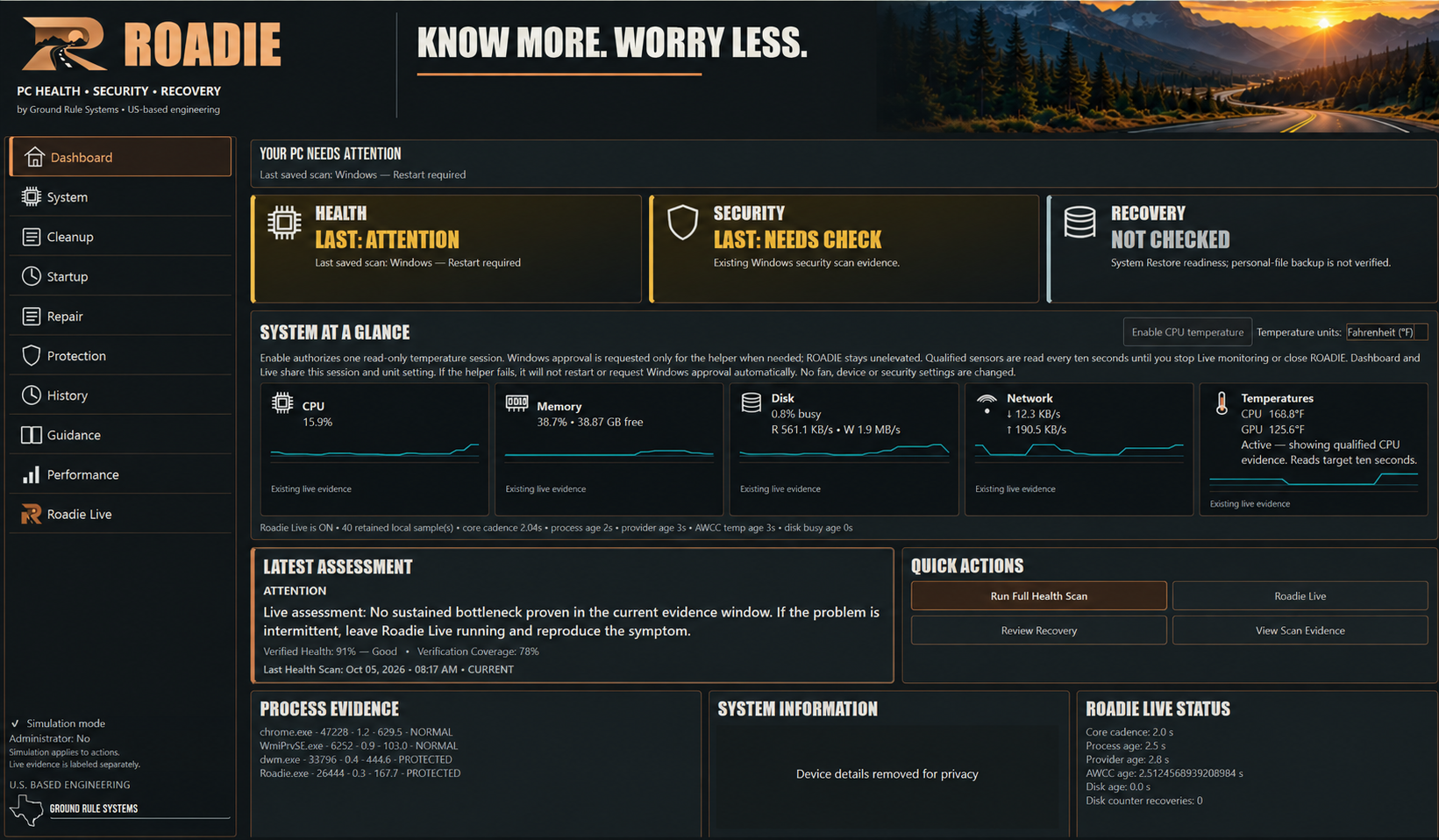
Roadie is being built around the three questions a PC owner actually cares about: Is it running right? Is it protected? Can I recover when something goes wrong?
CPU, memory, disk, network, temperatures and processes—turned into useful answers instead of a wall of numbers.
Roadie aims to show whether important Windows protections are working and whether meaningful conditions change—without turning ordinary maintenance into a crisis.
Recovery readiness matters before the bad day. Roadie aims to track recovery status and verify outcomes instead of assuming a repair worked.
Roadie does not throw alarms because one number looks ugly. The intended process observes, correlates, explains, recommends, and verifies.
Gather real system evidence without becoming the problem.
Connect symptoms and trends instead of guessing from one bad sample.
Put the conclusion first, then show the evidence behind it.
Check whether the condition actually changed and close the loop.
ROADIE is being tested against CPU load, memory pressure, disk counter faults, process attribution, and thermal recovery. The goal is not to throw alarms. The goal is to know when the evidence actually supports one.
Roadie is not being built to win by deleting more registry entries. The target is better diagnosis, safer maintenance, useful security awareness, and recovery that closes the loop.
Here is the product comparison list behind ROADIE's development priorities. The ROADIE column describes work in progress and future goals; it is not a list of features available to download today.
| Capability | ROADIE direction | Typical cleanup utility* |
|---|---|---|
| PC health check | In development Evidence-led health reasoning | General health summary |
| CPU monitoring | In development Load trends and diagnostic episodes | Basic system information |
| CPU temperature | In development Thermal observations and context | Varies by product |
| GPU temperature | In development Temperature observations | Varies by product |
| Memory diagnosis | In development Pressure and process context | Memory optimization focus |
| Disk activity diagnosis | In development Evidence behind disk findings | Disk cleanup focus |
| Process attribution | In development Connect activity to processes | Varies by product |
| Startup analysis | Planned Explain startup impact | Commonly offered |
| Junk cleanup | Planned Safety-first cleanup | Core focus |
| Software updater | Planned Update awareness | Offered by some products |
| Driver awareness | Planned Show relevant driver context | Updater focus in some products |
| Security status | Planned Dedicated security view | Varies by product |
| Windows security verification | Planned Check protection status | Varies by product |
| Suspicious-change awareness | Planned Explain meaningful changes | Varies by product |
| Recovery readiness | In development Dedicated recovery view | Varies by product |
| Restore-point verification | In development Check readiness and outcomes | Varies by product |
| File recovery | Planned Recovery guidance | Offered by some products |
| Diagnostic history | In development Retain useful evidence | Varies by product |
| Plain-English diagnosis | In development Explain what matters | Basic guidance varies |
| Explain why the PC slowed down | In development Connect symptoms and causes | Varies by product |
| Verify problem recovered | In development Recheck after changes | Varies by product |
| Evidence behind diagnosis | In development Show the supporting observations | Varies by product |
| Diagnostic / support package | Planned Shareable findings | Varies by product |
| Remote monitoring | Future ROADIE Connected concept | Usually a separate solution |
| Cloud backup | Future Recovery Vault concept | Varies by product |
Development status matters. In development, planned, and future items are goals until tested and released. No ROADIE download is available yet. *The other column describes broad cleanup-utility patterns; specific products and tiers vary.
Interested in helping test ROADIE? Sign up for beta invitations and occasional development updates. We'll share supported systems and next steps as the beta gets ready.
We want beta testers who will help us evaluate plain-English diagnostics, system behavior, and recovery guidance across supported Windows PCs.
Want to help test ROADIE? Tell us what you hope to test. You can also write to support@groundrulesystems.com.
The beta is in development. Signing up expresses interest; it does not guarantee an invitation.
Open the Contact Us formStart with the evidence. Our guide shows what to check in Windows before choosing what to change.
Roadie is being built on an architecture that can grow without pretending future capabilities already exist.
Secure remote health, security and recovery visibility for the computers you care about.
Encrypted cloud backup with version history and verified recovery.
Important Windows protection status and changes without pretending Roadie is an antivirus engine.
Owner-authorized lost/stolen-device assistance where supported by Windows and the hardware.
Roadie is under active development by Ground Rule Systems. Public release is not open yet. No download or purchase is available on this site.
Join the beta interest list